Bookeva
    • All featuresEverything Bookeva does for your hotel.
    • Channel managerBooking.com, Expedia, Agoda, Airbnb and 60+ more sites from one calendar.
    • Front deskKnow your day: arrivals, rooms and payments.
    • Direct bookingTake bookings with no commission.
    • RatesChange prices once for every site.
    • Guest experienceA stay page and door codes for guests.
    • HousekeepingKnow which rooms are ready.
    • Demo HotelClick around a sample hotel. Nothing is saved.
    • Vacation apartments and homesEvery site, one calendar, and a stay page that lets guests in without you.
    • Boutique hotelsSell on every site, welcome guests properly and see your whole day on one screen.
    • HostelsOne calendar for every room, every site and every arrival.
    • Bed & breakfasts and guest housesBookings, prices and guest messages in one system, built for hosts who do it all.
    • AparthotelsPrices, availability and check-in handled in one place.
    • Switch to BookevaImport your upcoming bookings, connect your sites and start your free trial.
    • GuidesStep-by-step help for setup and daily work.
    • BlogPractical advice for independent hotels.
    • FAQAnswers about the trial, sites and billing.
    • Talk to usAsk us anything and pick days for a call.
  • Integrations
  • Pricing
Log inStart your free trial
HomeFeaturesGuest experience
Guest experience

Let guests check in online and arrive without waiting for keys.

Guests check in online on their own stay page before they arrive. With the locks add-on it also shows a door code that works only for their dates.

Start your free trialTalk to us
Guest experience
  • Personal stay page
  • Arrival information
  • Bookeva Access
  • Online check-in
  • Requests to you
  • Automatic emails
  • Extras

What you get

Personal stay page

Each guest gets one stay page that opens in any browser, with the details of their stay.

Arrival information

Wi-Fi and directions appear on the stay page during the stay.

Bookeva Access

A door code for TTLock locks that works only during the stay. It is shown on the stay page, never written in an email.

Online check-in

Guests fill in their registration on their stay page before they arrive. You choose the fields, and answers save as they type.

Requests to you

Guests ask for a change, a cancellation or an extra from their stay page. You decide.

Automatic emails

Emails for booking confirmation, before arrival, arrival day and review requests go out when you turn them on.

Extras

Offer the extras you set up, such as breakfast or parking.
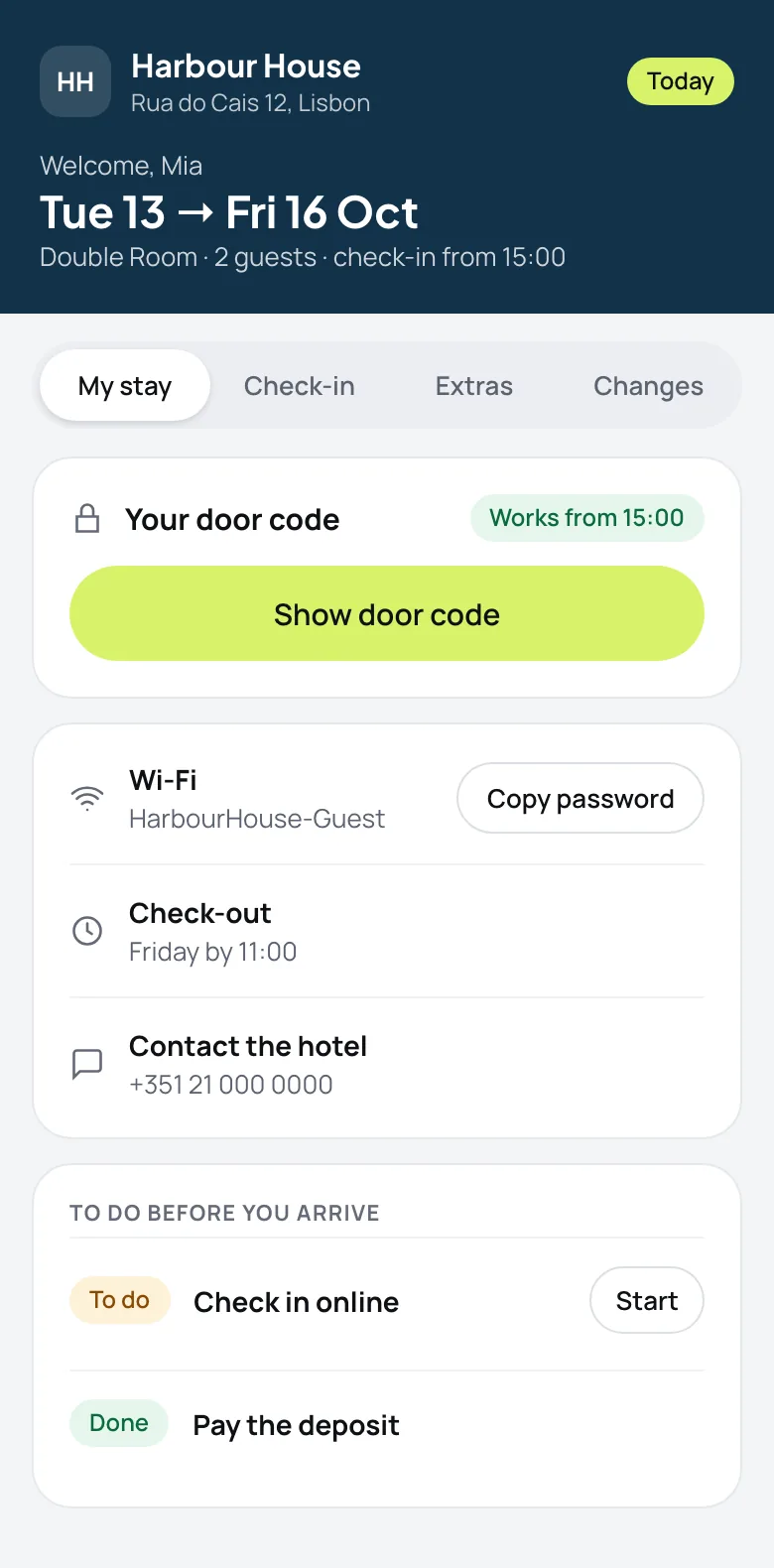
A guest's stay page on a phone, showing a Show door code button, Wi-Fi, check-out time and a to-do list with online check-in

One page for the whole stay

  • Safer door codesThe code lives on the stay page and is never written in an email.
  • Answers before they askWi-Fi, check-out time and hotel contact in one place.
  • Guests know what is nextA short to-do list: check in online, pay the deposit.
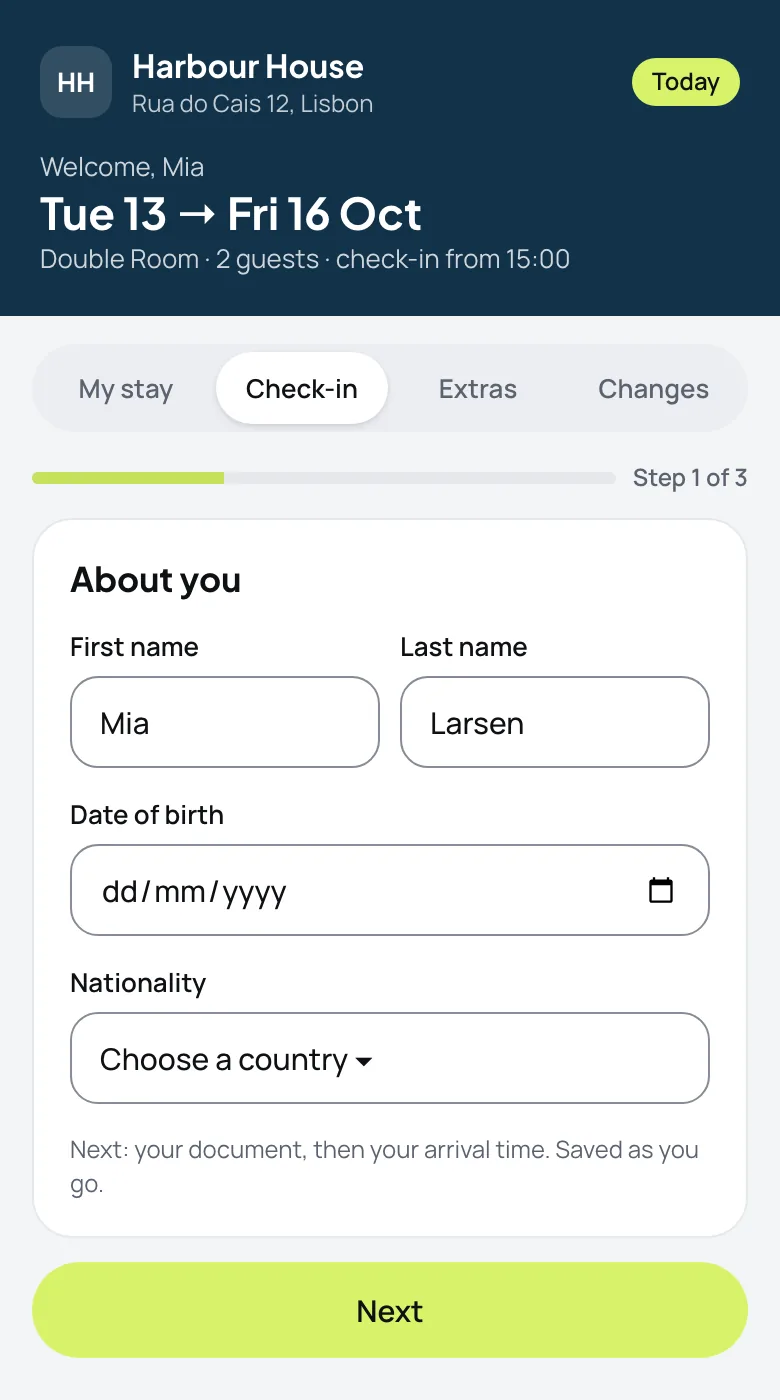
Online check-in on a phone: first name, last name, date of birth and nationality, with step 1 of 3 and a Next button

Online check-in, live

  • Check-in before arrivalGuests fill in their details before they arrive, so the desk only says welcome.
  • Easy on a phoneAnswers save as they type, in three short steps.
  • Less data, held safelyYou choose the fields. Only the last four characters of a document number are kept, never a photo.

How it works

  1. 1

    Booking confirmed

    The guest gets the link to their stay page.

  2. 2

    Check in online

    They fill in their details online and see Wi-Fi and directions.

  3. 3

    Arrive with a code

    The door code works from arrival and stops at check-out.

Good to know

See all questions
Door codes work with TTLock locks. They need the locks add-on.
No. The stay page opens in any phone browser.
Yes. Guests fill in their registration on their stay page before they arrive. You choose the fields, what is required and how long the answers are kept, and answers save as they type.
No. Guests give the last four characters of a document number, never a photo, and tick a consent box before they submit.
Yes. Choose whether a guest gets their code only after payment, after registration, after terms are accepted, or any mix.
Yes. If you move a guest to another room, the code follows the stay.

Ready to stop retyping bookings?

14-day free trial. No credit card, no setup fee.

Start your free trialTalk to us
Bookeva

The hotel PMS and channel manager for vacation units, independent hotels, hostels and aparthotels.

Solutions
  • Vacation apartments and homes
  • Boutique hotels
  • Hostels
  • Bed & breakfasts and guest houses
  • Aparthotels
  • Switch to Bookeva
Resources
  • Guides
  • Blog
  • FAQ
  • Pricing
  • Demo Hotel
  • Changelog
Company
  • About us
  • Contact us
Legal
  • Terms of Service
  • Privacy Policy
  • Cookie Policy
  • Data Processing Agreement
  • Report a Legal Concern
  • Imprint
© 2026 Bookeva. All rights reserved.